Hey! Let’s dive into UART, a super cool way for gadgets like microcontrollers (think AVR Controller) to talk to each other. It’s like sending text messages between two devices, but instead of words, they send bits (0s and 1s). Here’s a simple explanation to get you started!
What is UART?
UART stands for Universal Asynchronous Receiver/Transmitter. It’s a way for two devices to send and receive data using just two wires:
• TX (Transmit): Sends data out.
• RX (Receive): Listens for incoming data.
It’s called “asynchronous” because there’s no clock wire telling both devices when to send or read data. Instead, they agree on a speed (called the baud rate) and use special signals to stay in sync.
Interface
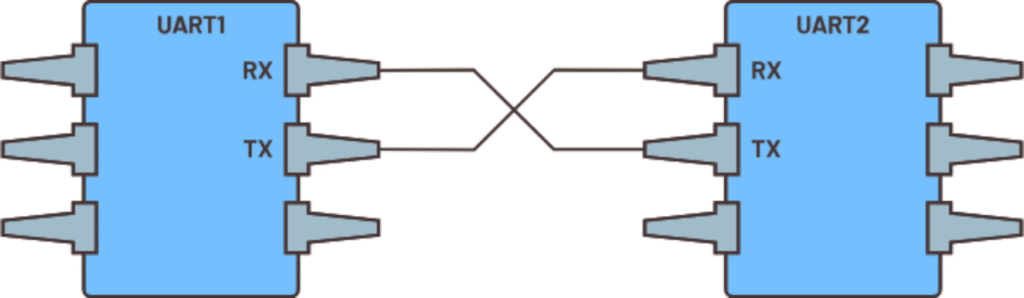
Two UARTs directly communicate with each other
How Does UART Work?
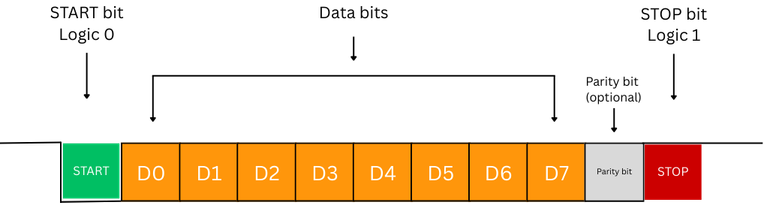
Imagine you’re sending a secret message, letter by letter. UART sends data in small packets called frames. Each frame is like a tiny envelope that carries one piece of data (like the letter ‘A’). Here’s what’s inside a frame:
1. Start Bit: A signal that says, “Hey, a message is coming!” (It’s like a whistle to get attention.)
2. Data Bits: Usually 5–8 bits that carry the actual message (e.g., the code for ‘A’ is 01000001).
3. Stop Bit(s): A signal that says, “Message done!” (Like a period at the end of a sentence.)
4. Sometimes there’s a Parity Bit (optional) to check for mistakes, like making sure the message wasn’t garbled.
Example: Sending the Letter ‘A’
Let’s say you want to send the letter ‘A’ from one device to another:
• ‘A’ in binary is 01000001 (8 bits).

• The TX wire sends this sequence, and the RX wire on the other device listens and reads it.
What’s the Baud Rate?
The baud rate is like the speed of talking. It’s how many bits get sent per second (e.g., 9600 baud = 9600 bits per second). Both devices need to use the same baud rate, or it’s like one person talking super fast and the other not keeping up—total confusion!
Common baud rates are 9600 or 115200. Think of it as picking the same radio station so both devices can “hear” each other clearly.
How Do the Devices Stay in Sync?
Since there’s no clock, the start bit acts like a heads-up. When the receiver sees the start bit, it starts counting time based on the baud rate to read the data bits one by one. The stop bit tells it, “All done, get ready for the next message!”
Cool Stuff About UART
• Simple: Just two wires (TX and RX) and a ground wire to connect devices.
• Two-Way Chat: One device’s TX connects to the other’s RX, and vice versa, so they can talk and listen at the same time (called full-duplex).
• Used Everywhere: In things like GPS modules, Bluetooth gadgets, or even when your Arduino talks to your computer.
Things to Watch Out For
• Short Distances: UART works best for short wires (a few meters), like connecting parts on your project.
• Speed Limits: It’s not super fast compared to other methods like USB.
• Mistakes: If the baud rates don’t match or there’s noise, the message might get jumbled.